
Introduction
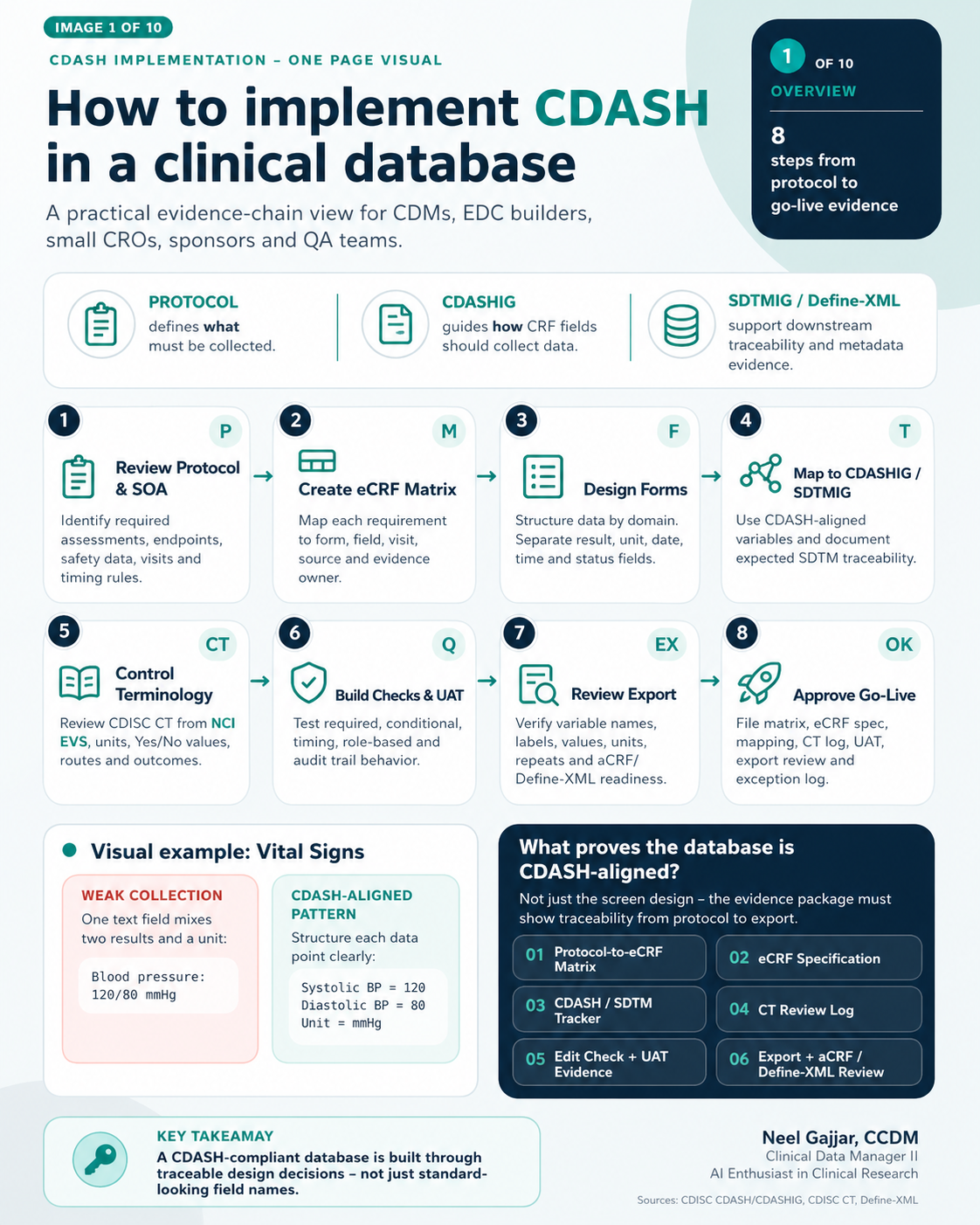
CDASH implementation is not about making an EDC screen look compliant - it is about building a traceable evidence chain from protocol requirements through to regulatory submission. A database that appears clean on the surface can still fail a regulatory review if the data collection structure cannot be mapped forward to SDTM without assumptions.
This guide covers the complete 8-step process for implementing CDASH-aligned data collection in a clinical trial database, grounded in CDISC standards and GCP-compliant data governance. All CDASH references align with CDASHIG v2.1 unless otherwise noted. Throughout this guide, we use the HR-before-PK collection requirement as a worked example that runs through all 8 steps.
What Proves a Database is CDASH-Aligned?
A database is not CDASH-aligned simply because the screens look good. The evidence package must prove traceability at every layer:
| Evidence Document | What It Proves |
|---|---|
| Protocol-to-eCRF Matrix | Every protocol-required data point is mapped to a form and field |
| eCRF Specification | Defines each form's fields, data type, edit check logic, and collection behaviour |
| CDASH/SDTM Tracker | Shows how each eCRF variable maps to a CDASH concept and expected SDTM domain |
| CT Review Log | Documents controlled terminology values, version, approved labels, and NCI EVS support |
| UAT Test Case Evidence | Positive, negative, role-based, and timing tests are passed and documented |
| Edit Check + UAT Evidence | All edit checks are tested and audit trail captures change |
| Export + aCRF Review | Export variable names and labels are understandable; aCRF is reviewed |
| Non-CDASH Justification Log | Justifies any field that deviates from CDASH collection pattern |
| Go-Live Approval Memo | Formal sign-off confirming readiness decision |
Key takeaway: CDASH alignment is proven by the evidence chain behind the form - not by how clean the form looks.
Step 1 - Review Protocol and Schedule of Activities
Start with what the protocol requires - not with the EDC screen.
The most common CDM error at the start of a study is opening the EDC builder before completing a thorough protocol read. Every data collection requirement must be derived from the protocol and Schedule of Activities (SOA), not inferred from a prior study template.
Read Protocol Language First
Look for explicit data requirements covering: inclusion/exclusion criteria, safety data (AEs, vitals, labs, ConMeds), efficacy endpoints, visit and assessment windows, and PK requirements including timing relationships and collection windows.
Example: If the protocol states "Heart Rate must be collected 5–7 minutes before the post-dose PK blood draw," that timing relationship is a CDM requirement - not optional field metadata.
| Requirement | Form | Criticality | Evidence |
|---|---|---|---|
| HR 5–7 min before PK | Vital Signs | Safety/timing | Protocol-to-eCRF Matrix |
| PK draw time | PK Collection | Endpoint support | Cross-form timing check |
| Unit expected | Vital Signs | Data quality | CT/unit review |
Do: Document every protocol-required data point before build begins.
Do not: Assume the form list is complete just because the SOA has been reviewed - requirements are embedded throughout the protocol body text.
Step 2 - Create the eCRF Matrix
Map each requirement to a form, field, visit, source, and evidence owner.
The eCRF Matrix is the master traceability document for the study. Every protocol-required clinical data point must appear in the matrix with no gaps and no undocumented assumptions.
| Protocol/SOA Item | eCRF Form | Field(s) | Evidence Owner |
|---|---|---|---|
| HR 5–7 min before post-dose PK | Vital Signs | HR result, unit, date, time | Lead CDM |
| PK reference time | PK Collection | PK Draw date/time | Bioanalytical/CDM |
| Timing confirmation | Cross-form logic | HR time vs PK time | EDC Builder |
Definition of Done: No protocol-required clinical data point is unmapped without documented justification. Every row must have: Matrix approved + Owner assigned + Evidence identified.
Step 3 - Design Forms
Structure data by domain. Separate result, unit, date, time, and status fields.
Weak collection: "Blood pressure: 120/80 mmHg" - single mixed field, cannot be split for SDTM.
CDASH-aligned: Systolic BP = 120 | Diastolic BP = 80 | Unit = mmHg - three separate, discrete, exportable fields.
| Field Label | Field Type | Why It Matters |
|---|---|---|
| HR Result | Numeric | Allows range checks and trend review |
| HR Unit | Dropdown | Controls units, e.g. beats/min |
| HR Date/Time | Date + Time | Proves timing relative to PK |
| Related PK Timepoint | Dropdown/Link | Supports cross-form timing review |
Step 4 - Map to CDASHIG and SDTMIG
Create traceability from eCRF fields to collection standards and expected submission structure.
| eCRF Field | CDASH/Collection Concept | SDTM Traceability | Artifact |
|---|---|---|---|
| HR Result | Collect numeric result | VSORRES / VSSTRRESN | Mapping tracker |
| HR Unit | Controlled unit value | VSORRESU / VSSTRESU | CT review log |
| HR Date/Time | Timing evidence | VSDTC | Mapping note |
| PK Link | Timing relationship | Supplemental Qualifier (SUPPQS) if no standard SDTM variable exists | Mapping note |
Note on Supplemental Qualifiers: Variables that do not fit a standard SDTM domain are captured in a Supplemental Qualifiers dataset (SUPPQS). This must be planned at build - variables requiring SUPPQS treatment cannot be retrofitted cleanly post-collection and create Define-XML complexity.
Step 5 - Control Terminology
Standardise dropdowns, units, and coded values before go-live.
Common failure pattern: One form uses Yes/No, another uses Y/N, a third uses True/False - creating systematic transformation work at submission and mapping risk in Define-XML.
For each controlled terminology list, document: source (CDISC CT, NCI EVS, or sponsor-defined), version and approval date, approved values list, and owner. CDISC CT is updated quarterly - confirm the version approved for your study at the time of build and record it in your CT Review Log.
Step 6 - Build Edit Checks and UAT
Convert protocol rules into edit checks and test both valid and invalid cases.
Edit check example: IF HR collection time is NOT 5–7 minutes before the assigned PK draw time, THEN trigger query.
| Scenario | Input Example | Expected Result |
|---|---|---|
| Valid timing | PK 10:00, HR 09:54 | Pass |
| Too early | PK 10:00, HR 09:40 | Query |
| Too late | PK 10:00, HR 09:58 | Query |
| Missing time | HR result entered, HR time blank | Query |
| Role/audit trail | Site corrects HR time | Audit trail captures change |
Definition of Done: Positive, negative, role-based, timing, and audit-trail tests are passed or documented. All UAT execution must be performed in a validated environment using documented, approved test scripts - informal or ad hoc testing does not satisfy UAT requirements under GCP.
Step 7 - Review the Export
Check the exported data - not just the EDC screen.
Red flag export: Column headers like Q1, Q2, DATE3 - variable names and labels do not preserve meaning. A programmer cannot map these to SDTM without additional documentation.
Traceable export: HR Result | Unit | HR DateTime - meaning is preserved for review, mapping, and traceability.
The Define-XML is generated from the aCRF variable metadata - variable names, labels, data types, and controlled terminology lists in the export directly determine the quality of the Define-XML that accompanies the submission package.
Export review checklist: Variable names and labels are understandable without a data dictionary · Units, dates, times, and coded values export correctly · Repeating forms and timepoints are identifiable · aCRF and Define-XML readiness is considered · Programmer can map without assumptions.
Step 8 - Approve Go-Live
Go-live is an evidence decision - not only a database build decision.
Before go-live: 100% Matrix complete · 0 critical gaps open · PASS on UAT and export review.
Go-live approval requires sign-off from the Lead CDM, Sponsor Data Management Representative, and QA - not just the EDC builder or project CDM. The approval memo documents that all evidence has been reviewed and accepted, and it becomes part of the trial master file.
Evidence package for go-live: Protocol-to-eCRF Matrix · eCRF Specification · CDASH/SDTM Tracker · CT Review Log · Edit Check + UAT Evidence · Export + aCRF Review · Non-CDASH Justification Log · Go-Live Approval Memo.
Key takeaway: A CDASH-aligned database is not proven by how clean the EDC screen looks. It is proven by the evidence chain behind the form.
About the Author
Neel Gajjar
CCDM®Clinical Data Manager II
Clinical Data Manager specialising in EDC systems, CDISC standards, and GCP-compliant data governance. Creator of the Clinical Research Learning Hub — a platform built to make rigorous clinical research education accessible to every professional in the field.
Connect on LinkedInAll content is expert-written and SME-reviewed. Regulatory references are verified against current ICH GCP E6(R2), FDA, and EMA guidance.
Comments
Leave a comment